将 Prisma ORM 添加到现有的 MongoDB 项目
MongoDB 是一款流行的基于文档的 NoSQL 数据库,以其灵活性、可扩展性和对开发者友好的特性而闻名。在本指南中,你将学习如何将 Prisma ORM 添加到现有的 TypeScript 项目中,将其连接到 MongoDB,检查现有的数据库模式,并使用类型安全的 Prisma Client 开始查询。
¥MongoDB is a popular document-based NoSQL database known for its flexibility, scalability, and developer-friendly features. In this guide, you will learn how to add Prisma ORM to an existing TypeScript project, connect it to MongoDB, introspect your existing database schema, and start querying with type-safe Prisma Client.
Prisma ORM v7 即将支持 MongoDB。同时,在使用 MongoDB 时,请使用 Prisma ORM v6.19(最新的 v6 版本)。
¥MongoDB support for Prisma ORM v7 is coming in the near future. In the meantime, please use Prisma ORM v6.19 (the latest v6 release) when working with MongoDB.
本指南使用 Prisma ORM v6.19 以确保与 MongoDB 完全兼容。
¥This guide uses Prisma ORM v6.19 to ensure full compatibility with MongoDB.
如果你要从 Mongoose 迁移到 Prisma ORM,请参阅我们的 从 Mongoose 迁移指南。
¥If you're migrating to Prisma ORM from Mongoose, see our Migrate from Mongoose guide.
先决条件
¥Prerequisites
为了成功完成本指南,你需要:
¥In order to successfully complete this guide, you need:
-
Node.js 安装在你的机器上(请参阅 系统要求 了解官方支持的版本)
¥Node.js installed on your machine (see system requirements for officially supported versions)
-
一个包含
package.json文件的现有 TypeScript 项目¥An existing TypeScript project with a
package.jsonfile -
访问具有副本集部署的 MongoDB 4.2+ 服务器。我们建议使用 MongoDB 阿特拉斯。
¥Access to a MongoDB 4.2+ server with a replica set deployment. We recommend using MongoDB Atlas.
MongoDB 数据库连接器使用事务来支持嵌套写入。事务需要部署 副本集。部署副本集最简单的方法是使用 阿特拉斯。开始使用是免费的。
¥The MongoDB database connector uses transactions to support nested writes. Transactions requires a replica set deployment. The easiest way to deploy a replica set is with Atlas. It's free to get started.
确保你手头有数据库 连接网址(包括你的身份验证凭据)!
¥Make sure you have your database connection URL (that includes your authentication credentials) at hand!
如果你的项目包含多个带有 package.json 文件的目录(例如 frontend、backend 等),请注意 Prisma ORM 专门设计用于 API/后端层。要设置 Prisma,请导航到包含相关 package.json 文件的相应后端目录并在那里配置 Prisma。
¥If your project contains multiple directories with package.json files (e.g., frontend, backend, etc.), note that Prisma ORM is specifically designed for use in the API/backend layer. To set up Prisma, navigate to the appropriate backend directory containing the relevant package.json file and configure Prisma there.
1. 设置 Prisma ORM
¥ Set up Prisma ORM
进入现有项目目录并安装所需的依赖:
¥Navigate to your existing project directory and install the required dependencies:
npm install prisma@6.19 @types/node --save-dev
npm install @prisma/client@6.19 dotenv
以下是每个包的功能:
¥Here's what each package does:
-
prisma- 用于运行prisma init、prisma db pull和prisma generate等命令的 Prisma CLI¥
prisma- The Prisma CLI for running commands likeprisma init,prisma db pull, andprisma generate -
@prisma/client- 用于查询数据库的 Prisma 客户端库¥
@prisma/client- The Prisma Client library for querying your database -
dotenv- 从你的.env文件加载环境变量¥
dotenv- Loads environment variables from your.envfile
这是 Prisma ORM v6 的最新稳定版本,完全支持 MongoDB。Prisma ORM v7 即将支持 MongoDB。
¥This is the latest stable version of Prisma ORM v6 that fully supports MongoDB. MongoDB support for Prisma ORM v7 is coming soon.
你还可以安装 prisma@6 和 @prisma/client@6 以自动获取最新的 v6 版本。
¥You can also install prisma@6 and @prisma/client@6 to automatically get the latest v6 release.
2. 初始化 Prisma ORM
¥ Initialize Prisma ORM
使用以下命令创建 Prisma 模式 文件,设置你的 Prisma ORM 项目:
¥Set up your Prisma ORM project by creating your Prisma Schema file with the following command:
npx prisma init --datasource-provider mongodb --output ../generated/prisma
此命令执行以下几项操作:
¥This command does a few things:
-
创建一个名为
prisma/的目录,其中包含一个schema.prisma文件,该文件包含数据库连接配置¥Creates a
prisma/directory with aschema.prismafile containing your database connection configuration -
在根目录中创建一个用于环境变量的
.env文件¥Creates a
.envfile in the root directory for environment variables -
创建一个用于 Prisma 配置的
prisma.config.ts文件¥Creates a
prisma.config.tsfile for Prisma configuration
生成的 prisma.config.ts 文件如下所示:
¥The generated prisma.config.ts file looks like this:
import { defineConfig, env } from 'prisma/config'

export default defineConfig({
  schema: 'prisma/schema.prisma',
  migrations: {
    path: 'prisma/migrations',
  },
  engine: "classic",
  datasource: {
    url: env('DATABASE_URL'),
  },
})
将 dotenv 添加到 prisma.config.ts,以便 Prisma 可以从 .env 文件加载环境变量:
¥Add dotenv to prisma.config.ts so that Prisma can load environment variables from your .env file:
import 'dotenv/config'
import { defineConfig, env } from 'prisma/config'

export default defineConfig({
  schema: 'prisma/schema.prisma',
  migrations: {
    path: 'prisma/migrations',
  },
  engine: "classic",
  datasource: {
    url: env('DATABASE_URL'),
  },
})
生成的 schema 使用带有自定义输出路径的 ESM 优先的 prisma-client 生成器:
¥The generated schema uses the ESM-first prisma-client generator with a custom output path:
generator client {
  provider = "prisma-client"
  output   = "../generated/prisma"
}

datasource db {
  provider = "mongodb"
  url = env("DATABASE_URL")
}
3. 连接你的数据库
¥ Connect your database
使用你的 MongoDB 连接 URL 更新 .env 文件:
¥Update the .env file with your MongoDB connection URL:
DATABASE_URL="mongodb+srv://username:password@cluster.mongodb.net/mydb"
对于 MongoDB Atlas,连接 URL 格式为:
¥For MongoDB Atlas, the connection URL format is:
mongodb+srv://USERNAME:PASSWORD@CLUSTER.mongodb.net/DATABASE
自托管 MongoDB 连接 URL 格式:
¥Self-hosted MongoDB connection URL format:
mongodb://USERNAME:PASSWORD@HOST:PORT/DATABASE
连接 URL 组件:
¥Connection URL components:
-
USERNAME:你的数据库用户名¥
USERNAME: Your database user name -
PASSWORD:你的数据库用户密码¥
PASSWORD: Your database user password -
PORT:数据库服务器运行的端口(通常为27017)¥
PORT: The port where your database server is running (typically27017) -
DATABASE:你的数据库名称¥
DATABASE: The name of your database
对于 MongoDB Atlas,你可以手动将数据库名称附加到连接 URL,因为 Atlas 默认情况下不包含数据库名称。
¥For MongoDB Atlas, you can manually append the database name to the connection URL, as Atlas doesn't include it by default.
故障排除连接问题
¥Troubleshooting connection issues
Error in connector: SCRAM failure: Authentication failed.
如果你看到 Error in connector: SCRAM failure: Authentication failed. 错误消息,你可以通过 adding ?authSource=admin 在连接字符串末尾指定身份验证的源数据库。
¥If you see the Error in connector: SCRAM failure: Authentication failed. error message, you can specify the source database for the authentication by adding ?authSource=admin to the end of the connection string.
Raw query failed. Error code 8000 (AtlasError): empty database name not allowed.
如果你看到 Raw query failed. Code: unknown. Message: Kind: Command failed: Error code 8000 (AtlasError): empty database name not allowed. 错误消息,请确保将数据库名称附加到数据库 URL。你可以在此 GitHub 问题 中找到更多信息。
¥If you see the Raw query failed. Code: unknown. Message: Kind: Command failed: Error code 8000 (AtlasError): empty database name not allowed. error message, be sure to append the database name to the database URL. You can find more info in this GitHub issue.
4. 检查你的数据库
¥ Introspect your database
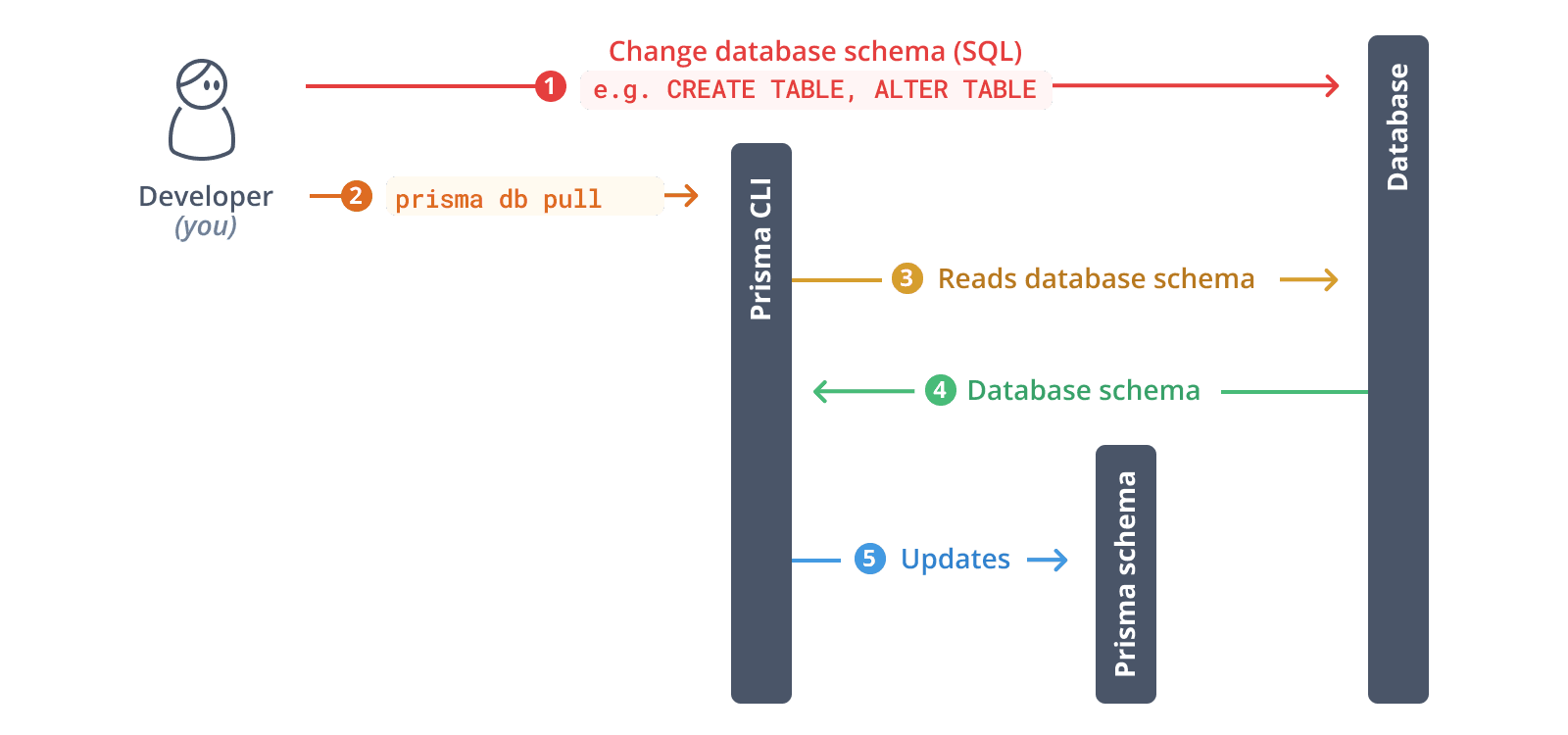
运行以下命令检查现有数据库:
¥Run the following command to introspect your existing database:
npx prisma db pull
这个命令:
¥This command:
-
从你的
.env文件中读取DATABASE_URL¥Reads the
DATABASE_URLfrom your.envfile -
连接到你的 MongoDB 数据库
¥Connects to your MongoDB database
-
对集合中的文档进行采样以推断模式
¥Samples documents in your collections to infer the schema
-
在你的
schema.prisma文件中生成 Prisma 模型¥Generates Prisma models in your
schema.prismafile
MongoDB 自省限制:Prisma 通过对文档进行抽样来检查 MongoDB。你可能需要手动执行以下操作:
¥MongoDB introspection limitations: Prisma introspects MongoDB by sampling documents. You may need to manually:
-
使用
@relation属性添加关系字段。¥Add relation fields using the
@relationattribute -
如果采样未捕获所有变体,请调整字段类型
¥Adjust field types if the sampling didn't capture all variations
-
添加自省过程中未检测到的索引和约束。
¥Add indexes and constraints not detected during introspection
5. 生成 Prisma ORM 类型
¥ Generate Prisma ORM types
根据你内省的 schema 生成 Prisma Client:
¥Generate Prisma Client based on your introspected schema:
npx prisma generate
这将在 generated/prisma 目录中创建一个针对你的数据库模式定制的类型安全的 Prisma 客户端。
¥This creates a type-safe Prisma Client tailored to your database schema in the generated/prisma directory.
6. 实例化 Prisma 客户端
¥ Instantiate Prisma Client
创建一个用于实例化 Prisma Client 的实用程序文件:
¥Create a utility file to instantiate Prisma Client:
import "dotenv/config";
import { PrismaClient } from '../generated/prisma/client'

const prisma = new PrismaClient()

export { prisma }
7. 查询数据库
¥ Query your database
现在你可以使用 Prisma Client 查询数据库。创建 script.ts 文件:
¥Now you can use Prisma Client to query your database. Create a script.ts file:
import { prisma } from './lib/prisma'

async function main() {
  // Example: Fetch all records from a collection
  // Replace 'user' with your actual model name
  const allUsers = await prisma.user.findMany()
  console.log('All users:', JSON.stringify(allUsers, null, 2))
}

main()
  .then(async () => {
    await prisma.$disconnect()
  })
  .catch(async (e) => {
    console.error(e)
    await prisma.$disconnect()
    process.exit(1)
  })
运行脚本:
¥Run the script:
npx tsx script.ts
8. 发展你的架构
¥ Evolve your schema
MongoDB 不支持像关系型数据库那样的迁移。你可以使用 db push 来同步模式更改:
¥MongoDB doesn't support migrations like relational databases. Instead, use db push to sync schema changes:
8.1.更新 Prisma schema 文件
¥8.1. Update your Prisma schema file
使用所需的更改修改你的 Prisma 模式文件。例如,添加一个新模型:
¥Modify your Prisma schema file with the changes you want. For example, add a new model:
model Post {
  id        String   @id @default(auto()) @map("_id") @db.ObjectId
  title     String
  content   String?
  published Boolean  @default(false)
  authorId  String   @db.ObjectId
  author    User     @relation(fields: [authorId], references: [id])
}

model User {
  id    String @id @default(auto()) @map("_id") @db.ObjectId
  email String @unique
  name  String?
  posts Post[]
}
在 MongoDB 中,id 字段映射到 _id,并使用 @db.ObjectId 类型。关系使用带有 @db.ObjectId 注解的 String 类型。
¥In MongoDB, the id field is mapped to _id and uses @db.ObjectId type. Relations use String type with @db.ObjectId annotation.
8.2.将更改推送到数据库
¥8.2. Push the changes to your database
npx prisma db push
这个命令:
¥This command:
-
将模式更改应用到你的 MongoDB 数据库
¥Applies schema changes to your MongoDB database
-
自动重新生成 Prisma 客户端
¥Automatically regenerates Prisma Client
:::infodb push instead of migrations?][为什么
MongoDB 使用灵活的模式模型。Prisma Migrate(用于创建迁移文件)不支持 MongoDB。始终使用 prisma db push 来同步你的模式更改。
¥MongoDB uses a flexible schema model. Prisma Migrate (which creates migration files) is not supported for MongoDB. Always use prisma db push to sync your schema changes.
:::
9. 探索你的数据
¥ Explore your data
你可以使用 MongoDB 阿特拉斯、MongoDB shell 或 MongoDB Compass 查看和管理你的数据。
¥You can use MongoDB Atlas, the MongoDB shell, or MongoDB Compass to view and manage your data.
Prisma 工作室 目前不支持 MongoDB。未来版本可能会添加此功能。请参阅 Prisma 支持的数据库 Studio 了解更多信息。
¥Prisma Studio does not currently support MongoDB. Support may be added in a future release. See Databases supported by Prisma Studio for more information.
下一步
¥Next steps
你已成功设置 Prisma ORM。接下来你可以探索以下内容:
¥You've successfully set up Prisma ORM. Here's what you can explore next:
-
了解更多关于 Prisma 客户端的信息:探索 Prisma 客户端 API 的高级查询、筛选和关联功能
¥Learn more about Prisma Client: Explore the Prisma Client API for advanced querying, filtering, and relations
-
数据库迁移:了解 Prisma 迁移,以便演进你的数据库模式
¥Database migrations: Learn about Prisma Migrate for evolving your database schema
-
性能优化:Discover 查询优化技巧
¥Performance optimization: Discover query optimization techniques
-
构建完整应用:查看我们的 框架指南,了解如何将 Prisma ORM 与 Next.js、Express 等集成。
¥Build a full application: Check out our framework guides to integrate Prisma ORM with Next.js, Express, and more
-
加入社区:通过 Discord 与其他开发者连接
¥Join the community: Connect with other developers on Discord
更多信息
¥More info